
Intro:
In the ever-evolving landscape of digital marketing, choosing the right email marketing platform is paramount. Two giants, ConvertKit and HubSpot, stand out in the crowd. As we dive into this comprehensive comparison, our focus is on unraveling the intricacies of these platforms, with a keen eye on HubSpot pricing – a key factor for many businesses. Let’s explore which email marketing solution is the perfect fit for your needs.
Table of Contents
Quick Comparison:
For those seeking a rapid overview of the essential differences between ConvertKit and HubSpot pricing, this quick comparison aims to distill the key features, strengths, and considerations to aid in your decision-making process.
ConvertKit:
Strengths:
- Simplicity and User-Friendly Interface:
- ConvertKit is lauded for its intuitive design, making it exceptionally user-friendly, especially for beginners.
- The straightforward interface enables quick navigation and efficient use of its features without a steep learning curve.
- Creator Focus:
- Positioned as a platform for creators, bloggers, and small businesses, ConvertKit aligns its features with the unique needs of this demographic.
- It caters to those who prioritize essential email marketing tools without unnecessary complexity.
- Tagging and Segmentation:
- Robust tagging and segmentation features empower users to organize and categorize subscribers effectively.
- This capability allows for highly targeted campaigns based on subscriber behavior and engagement.
- Visual Automation Builder:
- The visual automation builder simplifies the creation of automation sequences.
- Users can design workflows visually, ensuring a clear understanding of the customer journey and facilitating personalized automation.
- Affordable Pricing:
- ConvertKit’s pricing is transparent, scalable, and often more budget-friendly for smaller businesses.
- The platform frequently offers free migration services, simplifying the transition for users moving from other email marketing solutions.
Considerations:
- Limited Advanced Features:
- While suitable for beginners, ConvertKit may lack some of the advanced features offered by more comprehensive platforms.
- Businesses with complex automation requirements or advanced customization needs may find limitations.
- Not an All-in-One Solution:
- ConvertKit primarily focuses on email marketing, lacking the broader suite of tools provided by all-in-one solutions like HubSpot.
- Users seeking a unified platform for various marketing functions may need to integrate ConvertKit with other tools.
- Less Comprehensive Analytics:
- The analytics dashboard, while providing valuable insights, may not be as comprehensive as that of more extensive platforms.
- Businesses with a strong emphasis on in-depth analytics might find ConvertKit’s reporting capabilities somewhat limited.
HubSpot:
Strengths:
- All-in-One Marketing Platform:
- HubSpot is a comprehensive all-in-one marketing platform, integrating email marketing, CRM, social media, and more.
- Users benefit from a unified ecosystem, streamlining collaboration and data sharing across various marketing channels.
- Personalization and Smart Content:
- HubSpot pricing excels in personalization, allowing users to create highly targeted and personalized content based on customer data.
- Smart content features enable the customization of emails and website content for different audience segments.
- Advanced Automation and A/B Testing:
- The platform offers advanced automation features, enabling users to create intricate workflows and automate complex marketing processes.
- A/B testing capabilities allow users to experiment with different elements of email campaigns, optimizing for better engagement.
- Extensive Integrations:
- HubSpot boasts an extensive marketplace with over 500 integrations, connecting with CRM, analytics, e-commerce, and productivity tools.
- The wide range of integrations enhances the platform’s adaptability to diverse business needs.
- CRM Integration and Predictive Lead Scoring:
- HubSpot’s CRM integration ensures a seamless flow of customer data between marketing and sales teams.
- Predictive lead scoring helps prioritize leads, focusing efforts on those most likely to convert.
Considerations:
- Learning Curve for Beginners:
- HubSpot’s comprehensive feature set may result in a steeper learning curve for beginners.
- Users transitioning from simpler platforms may need time to explore and fully utilize the extensive capabilities.
- Pricing Complexity:
- HubSpot’s pricing model can be more complex compared to straightforward solutions like ConvertKit.
- Users should carefully assess their specific needs and usage to determine the most cost-effective plan.
- Cost for Additional Features:
- While HubSpot’s basic features are available in lower-tier plans, access to advanced features may require subscribing to higher-priced plans.
- Users should evaluate whether the additional features justify the associated costs.
Choosing the Right Platform:
ConvertKit:
- Ideal for beginners, content creators, and small businesses seeking a simple and focused email marketing solution.
- Suited for those prioritizing ease of use, basic automation, and affordability.
HubSpot:
- Suited for growing businesses and enterprises looking for an all-in-one marketing platform with advanced features.
- Ideal for those prioritizing comprehensive analytics, personalization, and integration across multiple marketing channels.
Consider Your Priorities:
- Assess your business priorities, budget constraints, and the specific features critical to your marketing strategy.
- The right choice depends on your unique needs and the level of complexity your business demands.
Features:
The success of an email marketing platform often hinges on the range and effectiveness of its features. In comparing ConvertKit and HubSpot pricing, we’ll dissect their capabilities across various critical aspects of email marketing to help you make an informed decision.
ConvertKit Features:
Subscriber Management:
ConvertKit excels in subscriber management, allowing users to create custom tags and segments effortlessly.
The platform facilitates easy organization of subscribers based on their behavior and interactions.
Automation:
ConvertKit’s automation features are intuitive, enabling users to create complex automation sequences through a simple visual interface.
Automation rules are triggered by subscriber actions, ensuring targeted and personalized communication.
Email Sequences:
The platform supports the creation of email sequences with ease, enabling users to set up drip campaigns and nurture leads over time.
Sequences can be tailored based on subscriber behavior, ensuring a dynamic and responsive email strategy.
Customizable Forms:
ConvertKit offers customizable forms that can be easily embedded on websites, allowing users to capture leads seamlessly. Forms are customizable in terms of design and functionality to match brand aesthetics.
Analytics:
The analytics dashboard provides valuable insights into campaign performance, subscriber engagement, and conversion rates. Users can track key metrics such as open rates, click-through rates, and subscriber growth over time.
All-in-One Marketing Platform:
HubSpot is renowned for its comprehensive suite of marketing tools, including email marketing, CRM, social media, and more. The all-in-one platform ensures seamless integration and collaboration across various marketing channels.
Personalization:
HubSpot excels in personalization, allowing users to create highly targeted and personalized content based on customer data. Dynamic content features enable the customization of emails for different audience segments.
Smart Content:
HubSpot’s smart content feature tailors website content based on a visitor’s lifecycle stage, ensuring a personalized user experience. This feature extends to email, allowing for dynamic and relevant content delivery.
A/B Testing:
HubSpot facilitates A/B testing for email campaigns, enabling users to experiment with different subject lines, content, and send times. Test results provide valuable insights for optimizing future campaigns.
Social Media Integration:
HubSpot’s integration with social media platforms streamlines cross-channel marketing efforts. Users can create and schedule social media posts directly within the platform, fostering a cohesive marketing strategy.
Collaboration and User Interface:
ConvertKit:
The platform is designed with a minimalist and user-friendly interface, making it accessible for beginners.
Collaboration features include the ability to share visual automations with team members for enhanced collaboration.
HubSpot:
HubSpot’s interface is intuitive and user-friendly, with drag-and-drop functionality for ease of use.
The platform fosters collaboration through shared dashboards, team permissions, and collaborative content creation.
Advanced Features:
ConvertKit:
While focused on simplicity, ConvertKit offers advanced features such as tagging, automation, and customizable reporting. The platform’s emphasis on automation allows users to create sophisticated workflows to nurture leads effectively.
HubSpot:
HubSpot pricing stands out with advanced features like predictive lead scoring, allowing users to prioritize and focus on leads most likely to convert. The platform’s CRM integration enhances the depth of customer data available for targeted campaigns.
Ease of Use:
ConvertKit:
Known for its user-friendly interface, ConvertKit is particularly accessible for those new to email marketing.
The platform’s straightforward design ensures users can navigate and utilize its features with minimal learning curve.
HubSpot:
Despite its comprehensive feature set, HubSpot pricing maintains an intuitive interface that caters to users of all skill levels. The platform provides robust training resources for users to leverage its full suite of tools effectively.
Innovations and Updates:
ConvertKit:
ConvertKit consistently rolls out updates and improvements, often driven by user feedback. The platform’s commitment to staying agile ensures users benefit from the latest advancements in email marketing.
HubSpot:
HubSpot’s commitment to innovation is evident through regular updates and the introduction of new features.
The platform’s user community often influences updates, ensuring a user-centric approach to development.
Third-Party Integrations:
ConvertKit:
While not as extensive as some all-in-one solutions, ConvertKit integrates seamlessly with popular tools such as Shopify, WordPress, and more. The platform’s API allows for custom integrations, expanding its compatibility with various business tools.
HubSpot:
HubSpot boasts an extensive marketplace with over 500 integrations, connecting with CRM, analytics, e-commerce, and productivity tools. The platform’s open API allows for additional custom integrations, ensuring flexibility for businesses with diverse tech stacks.
Mobile Responsiveness:
ConvertKit:
ConvertKit’s email templates are designed to be mobile-responsive, ensuring a seamless experience for subscribers on various devices. The platform prioritizes responsive design to accommodate the increasing use of mobile devices for email consumption.
HubSpot:
HubSpot’s email editor includes mobile preview features, allowing users to optimize their campaigns for mobile devices. The platform emphasizes the importance of responsive design in the creation of effective and engaging emails.
Pricing:
HubSpot pricing is a critical factor for many businesses. Let’s delve into the cost structures of both platforms, breaking down their pricing plans to help you make an informed decision. The following tables reflect the most current pricing information.
ConvertKit Pricing:
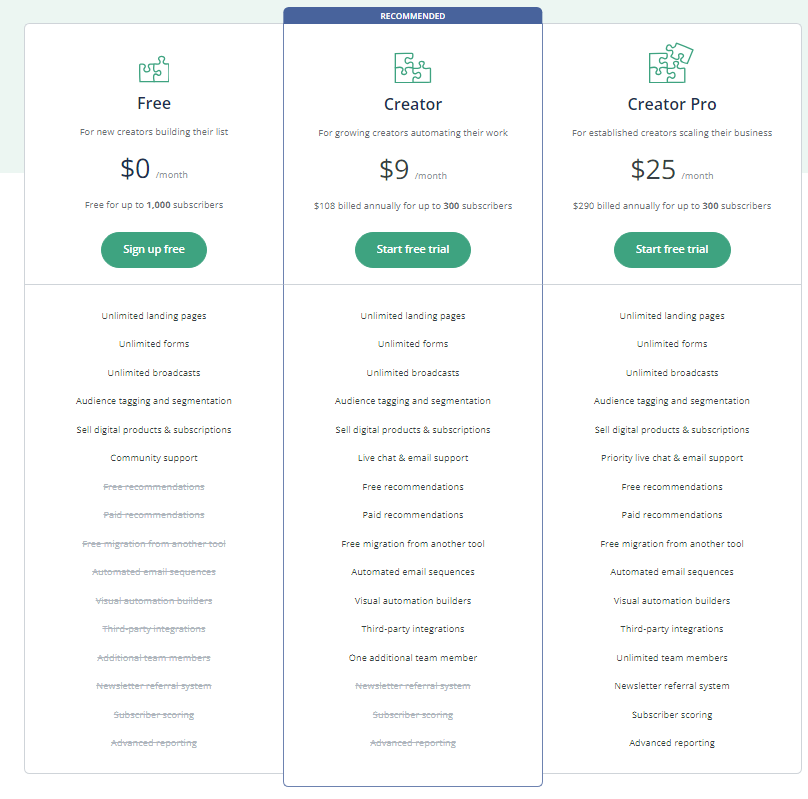
ConvertKit has three pricing plans as Figure 1.0 beow: Free, Creator, and Creator Pro. Here is a brief overview of what each plan offers:
- Free: This plan is for new creators who are building their list. You can have up to 1,000 subscribers and access unlimited landing pages, forms, broadcasts, and tagging. You can also sell digital products and subscriptions with a 3.5% transaction fee. This plan is free forever.
- Creator: This plan is for growing creators who want to automate their work. You can have up to 300 subscribers for $9/month if you pay annually, or $15/month if you pay monthly. You can access everything in the Free plan, plus automated email sequences, visual automation builders, integrations, one additional team member, and more. You can also sell digital products and subscriptions with a 3% transaction fee.
- Creator Pro: This plan is for established creators who want to scale their business. You can have up to 300 subscribers for $25/month if you pay annually, or $29/month if you pay monthly. You can access everything in the Creator plan, plus subscriber scoring, advanced reporting, unlimited team members, newsletter referral system, and more. You can also sell digital products and subscriptions with a 2% transaction fee.
You can compare the full feature list of each plan on the ConvertKit website as per image link below. You can also start a free trial of the Creator or Creator Pro plan for 14 days .
HubSpot Pricing:
If you are looking for a CRM suite that can help you with marketing, sales, service, and customer experience, you might want to check out HubSpot’s pricing plans. HubSpot pricing offers four hubs: Marketing, Sales, Service, and CMS, each with free tools and three paid plans: Starter, Professional, and Enterprise .
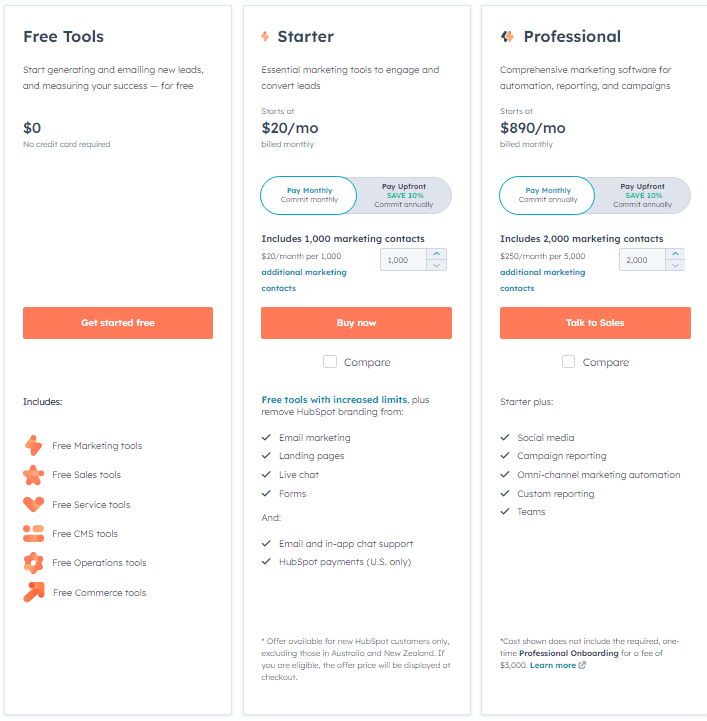
The Starter plan – Figure 3.0 below – is a discounted bundle of all the hubs that offers essential features for small businesses and individuals. It costs $20/month for the first 1,000 contacts .
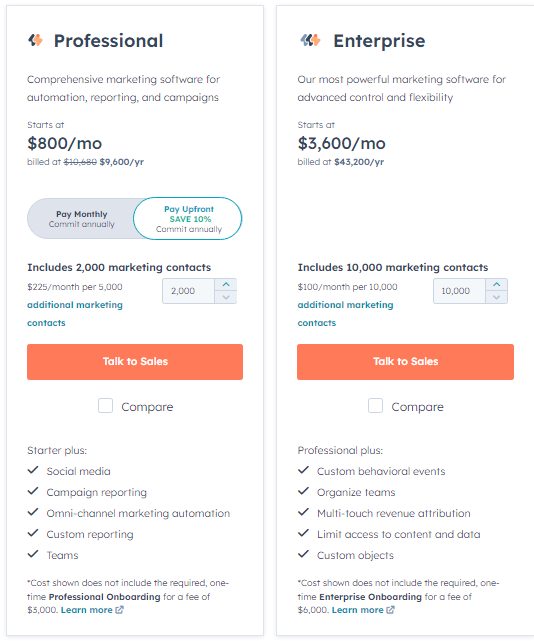
The Professional plan is a comprehensive marketing software that includes social media, custom reporting, omni-channel marketing automation, teams, and campaign reporting. It costs $800/month for the first 2,000 contacts .
The Enterprise plan – Figure 2.0 below – is the most powerful marketing software that offers advanced control and flexibility. It includes custom objects, multi-touch revenue attribution, custom behavioral events, and limit access to content and data. It costs $3,600/month for the first 10,000 contacts .
You can compare the features of each plan on HubSpot’s website. HubSpot pricing also offers a free trial for 14 days for the Professional and Enterprise plans. You can compare the full feature list of each plan on the Hubspot website as per image link as figures 2.0 and 3.0 below.
Pros & Cons:
Email marketing platforms play a crucial role in shaping a brand’s digital communication strategy. In comparing ConvertKit and HubSpot, it’s essential to weigh the pros and cons of each platform to make an informed decision. Let’s break down the strengths and weaknesses of ConvertKit and HubSpot pricing to guide your choice.
ConvertKit:
Pros:
Simplicity and User-Friendly Interface:
ConvertKit is renowned for its intuitive and straightforward interface, making it particularly accessible for beginners. The platform’s design prioritizes ease of use, allowing users to navigate and utilize features with minimal learning curve.
Focus on Creators and Bloggers:
Tailored for content creators, bloggers, and small businesses, ConvertKit aligns its features with the needs of this demographic. The platform emphasizes essential tools for effective email marketing without unnecessary complexity.
Tagging and Segmentation:
ConvertKit excels in subscriber management, offering robust tagging and segmentation features. Users can easily organize and categorize subscribers based on their behavior and engagement, allowing for highly targeted campaigns.
Visual Automation Builder:
The visual automation builder simplifies the creation of intricate automation sequences.
Users can design workflows visually, ensuring a clear understanding of the customer journey and personalized automation.
Affordable Pricing and Free Migration:
ConvertKit’s pricing is transparent, scalable, and often more budget-friendly for smaller businesses.
The platform frequently offers free migration services for users transitioning from other email marketing solutions, ensuring a smooth onboarding process.
Cons:
Limited Advanced Features:
While suitable for beginners, ConvertKit may lack some of the advanced features offered by more comprehensive platforms. Businesses with complex automation requirements or advanced customization needs may find limitations.
Not an All-in-One Solution:
ConvertKit focuses primarily on email marketing, lacking the broader suite of tools offered by all-in-one solutions like HubSpot. Users seeking a unified platform for various marketing functions may need to integrate ConvertKit with other tools.
Less Comprehensive Analytics:
The analytics dashboard, while providing valuable insights, may not be as comprehensive as that of more extensive platforms. Businesses with a strong emphasis on in-depth analytics might find ConvertKit’s reporting capabilities somewhat limited.
HubSpot:
Pros:
All-in-One Marketing Platform:
HubSpot stands out as a comprehensive all-in-one marketing platform, integrating email marketing, CRM, social media, and more. Users benefit from a unified ecosystem, streamlining collaboration and data sharing across various marketing channels.
Personalization and Smart Content:
HubSpot pricing excels in personalization, allowing users to create highly targeted and personalized content based on customer data. Smart content features enable the customization of emails and website content for different audience segments.
Advanced Automation and A/B Testing:
The platform offers advanced automation features, enabling users to create intricate workflows and automate complex marketing processes. A/B testing capabilities allow users to experiment with different elements of email campaigns, optimizing for better engagement.
Extensive Integrations:
HubSpot pricing boasts an extensive marketplace with over 500 integrations, connecting with CRM, analytics, e-commerce, and productivity tools.
The wide range of integrations enhances the platform’s adaptability to diverse business needs.
CRM Integration and Predictive Lead Scoring:
HubSpot’s CRM integration ensures a seamless flow of customer data between marketing and sales teams.
Predictive lead scoring helps prioritize leads, focusing efforts on those most likely to convert.
Cons:
Learning Curve for Beginners:
HubSpot’s comprehensive feature set may result in a steeper learning curve for beginners.
Users transitioning from simpler platforms may need time to explore and fully utilize the extensive capabilities.
Pricing Complexity:
HubSpot’s pricing model can be more complex compared to straightforward solutions like ConvertKit.
Users should carefully assess their specific needs and usage to determine the most cost-effective plan.
Cost for Additional Features:
While HubSpot’s basic features are available in lower-tier plans, access to advanced features may require subscribing to higher-priced plans. Users should evaluate whether the additional features justify the associated costs.
Choosing the Right Platform:
ConvertKit:
Ideal for beginners, content creators, and small businesses seeking a simple and focused email marketing solution. Suited for those prioritizing ease of use, basic automation, and affordability.
HubSpot:
Suited for growing businesses and enterprises looking for an all-in-one marketing platform with advanced features. Ideal for those prioritizing comprehensive analytics, personalization, and integration across multiple marketing channels.
Integrations:
The success of an email marketing platform is often amplified by its ability to seamlessly integrate with other essential tools and platforms, providing users with a comprehensive and interconnected ecosystem. Both ConvertKit and HubSpot pricing prioritize integrations to enhance the overall functionality of their platforms. Let’s explore the integrations for both, delving into specific categories and considering how they contribute to the efficiency and effectiveness of your email marketing strategy.
ConvertKit Integrations:
E-commerce Platforms:
ConvertKit offers integrations with popular e-commerce platforms like Shopify and WooCommerce.
This integration allows businesses to sync customer data, track purchase behavior, and create targeted email campaigns for a personalized shopping experience.
Lead Generation and Forms:
Seamless integration with lead generation tools such as OptinMonster and Thrive Leads empowers users to create engaging forms that capture leads effectively.
The integration streamlines the transfer of lead data, ensuring a smooth transition from acquisition to communication within ConvertKit.
Payment Processors:
For businesses selling digital products, ConvertKit integrates with payment processors like Stripe.
This integration enables a direct connection between purchases and customer information, facilitating targeted marketing based on transaction history.
Zapier Integration:
ConvertKit’s compatibility with Zapier broadens its integration capabilities, connecting with over 3,000 apps.
Users can create custom workflows, automate tasks, and seamlessly connect ConvertKit with a variety of third-party tools without intricate coding requirements.
WordPress Integration:
With a native WordPress plugin, ConvertKit ensures a smooth integration with WordPress sites.
Users can embed forms easily, track subscriber engagement, and manage lists directly within the WordPress dashboard.
HubSpot Pricing Integrations:
CRM Integrations:
HubSpot pricing, as an all-in-one marketing platform, integrates seamlessly with popular CRMs such as Salesforce, Microsoft Dynamics, and others.
This integration ensures a unified view of customer interactions, with data synchronization across marketing and sales teams.
Analytics and Reporting:
Integration with analytics tools like Google Analytics provides comprehensive insights into website and campaign performance.
Users can track key metrics, analyze user behavior, and make data-driven decisions to optimize their marketing strategy.
Social Media Integrations:
HubSpot pricing integrates with major social media platforms, including Facebook, Twitter, and LinkedIn.
This integration streamlines social media posting, allows for social listening, and provides insights into the effectiveness of social campaigns within the HubSpot pricing dashboard.
E-commerce Platforms:
For businesses with an e-commerce focus, HubSpot integrates with platforms such as Shopify.
This integration ensures the seamless flow of customer data, allowing for targeted email campaigns, personalized recommendations, and effective customer segmentation.
Workflow Automation:
HubSpot’s integration with workflow automation tools like Zapier extends its automation capabilities.
Users can design sophisticated workflows, connect HubSpot with diverse third-party applications, and create seamless, automated processes.
Deliverability:
Ensuring your meticulously crafted emails reach the intended audience is not just a matter of sending, but of reaching the inbox. The deliverability rates of ConvertKit and HubSpot pricing play a pivotal role in determining the success of your email marketing campaigns.
ConvertKit Deliverability:
ConvertKit boasts a robust infrastructure designed to optimize email deliverability. With a dedicated team constantly monitoring and refining their delivery systems, ConvertKit endeavors to minimize the likelihood of your emails ending up in spam folders. The platform’s commitment to maintaining positive sender reputation is evident through its emphasis on clean, permission-based lists. ConvertKit also provides tools for list segmentation and subscriber management, allowing you to tailor your content to specific audience segments, further enhancing deliverability.
Additionally, ConvertKit offers features like DKIM (DomainKeys Identified Mail) and SPF (Sender Policy Framework) authentication, contributing to the authentication of your emails and reinforcing their legitimacy. This attention to detail is crucial in today’s digital landscape where spam filters are increasingly sophisticated.
HubSpot Deliverability:
HubSpot, being an all-encompassing marketing platform, places a significant emphasis on email deliverability. With a comprehensive suite of tools, HubSpot pricing aims to ensure that your emails not only reach the inbox but also engage the audience effectively. HubSpot pricing leverages its global sending infrastructure and a dedicated team of deliverability experts to maintain high deliverability rates.
Similar to ConvertKit, HubSpot employs authentication protocols such as DKIM and SPF, and it provides DMARC (Domain-based Message Authentication, Reporting, and Conformance) functionality. These measures collectively enhance the credibility of your emails, reducing the likelihood of them being marked as spam. HubSpot pricing also offers list segmentation and personalization options, empowering you to send targeted, relevant content to different segments of your audience, further contributing to positive deliverability outcomes.
Monitoring and Analytics:
Both ConvertKit and HubSpot equip users with tools to monitor and analyze the performance of their email campaigns. Tracking metrics such as open rates, click-through rates, and bounce rates provides valuable insights into the effectiveness of your email strategy. ConvertKit’s dashboard provides a clear overview of these metrics, allowing you to assess the impact of your campaigns at a glance.
On the other hand, HubSpot takes analytics a step further with its detailed reporting and analytics suite. HubSpot’s platform provides granular insights into individual contact engagement, enabling you to refine your approach based on real-time data. This level of analytics not only aids in gauging deliverability but also empowers you to optimize your content and strategy continually.
Testing and Optimization:
Both platforms facilitate testing and optimization to enhance deliverability. ConvertKit offers A/B testing capabilities, allowing you to experiment with different subject lines, content, or send times to identify the most effective combinations. This iterative approach aids in refining your campaigns for maximum impact.
HubSpot, with its advanced testing and optimization features, takes experimentation to the next level. Whether it’s testing variations of your email content, sending times, or even entire campaign strategies, HubSpot’s tools enable you to refine your approach based on concrete data, ultimately contributing to improved deliverability over time.
In summary, while both ConvertKit and HubSpot pricing prioritize email deliverability, the nuanced differences in their approaches and additional features may sway your decision based on the specific needs and goals of your email marketing strategy. It’s essential to closely evaluate these aspects to ensure your messages not only reach your audience but also resonate with them effectively.
Data Protection:
In an era where data privacy is at the forefront of digital concerns, evaluating how ConvertKit and HubSpot handle data protection is crucial for businesses entrusted with sensitive customer information.
ConvertKit Data Protection:
ConvertKit is designed with a focus on simplicity and transparency, extending to its approach to data protection. The platform is GDPR-compliant (General Data Protection Regulation), aligning with the stringent data privacy requirements outlined by the European Union. ConvertKit ensures that user data is processed lawfully, transparently, and for legitimate purposes.
One standout feature of ConvertKit is its commitment to permission-based marketing. Subscribers must explicitly opt-in to receive communications, ensuring compliance with anti-spam regulations globally. ConvertKit empowers users with tools to manage and monitor subscriber consent, allowing for easy identification and handling of any unsubscribed or inactive contacts.
Additionally, ConvertKit provides features like subscriber tagging and segmentation, allowing users to organize and manage data more efficiently. The platform emphasizes data minimization, encouraging users to collect only the essential information required for effective communication.
HubSpot Data Protection:
HubSpot, as a comprehensive marketing platform, places a paramount emphasis on data protection. GDPR compliance is integrated into the core functionality of HubSpot, ensuring that user data is handled with the highest standards of security and transparency. HubSpot’s data processing agreement explicitly outlines the terms of data processing, providing users with clear insights into how their data is handled.
HubSpot’s commitment to data security is evident through features like two-factor authentication, ensuring that only authorized personnel can access sensitive information within the platform. The platform also provides robust access controls, allowing businesses to define roles and permissions for team members, reducing the risk of unauthorized data access.
Furthermore, HubSpot’s data retention policies enable users to define how long certain types of data are retained within the platform. This feature aligns with data minimization principles, ensuring that businesses only retain information for as long as necessary.
Data Encryption:
Both ConvertKit and HubSpot pricing employ encryption protocols to safeguard data during transmission and storage. SSL/TLS encryption secures data as it travels between users and the platforms, preventing unauthorized access. ConvertKit uses industry-standard encryption practices to protect subscriber data and login credentials.
Similarly, HubSpot pricing employs robust encryption mechanisms, including SSL/TLS for data in transit and AES-256 encryption for data at rest. These encryption measures collectively contribute to the overall security of sensitive information within the platform.
Compliance and Certification:
ConvertKit and HubSpot pricing undergo regular audits and certifications to demonstrate their commitment to data protection. ConvertKit has obtained the SOC 2 Type II certification, a recognized standard for SaaS providers, indicating the platform’s adherence to strict security and privacy controls.
HubSpot, in addition to SOC 2 Type II certification, complies with various international data protection standards, including ISO 27001 certification. These certifications underscore HubSpot’s dedication to maintaining a secure and compliant environment for user data.
Alternatives:
In the diverse landscape of email marketing solutions, several alternatives to ConvertKit and HubSpot pricing cater to various business needs. Let’s summarize the key features and considerations for each alternative:
Pros: Advanced automation, extensive integrations, and robust analytics.
Cons: Learning curve for beginners, potential higher pricing for smaller businesses.
Pros: User-friendly interface, affordability, and responsive customer support.
Cons: Limited advanced features compared to larger platforms.
Pros: Established reputation, user-friendly interface, and robust customer support.
Cons: Automation features not as advanced, potential pricing competitiveness.
Pros: Simplicity, affordability, and a visual campaign builder.
Cons: Limited advanced features, fewer integrations compared to established solutions.
Pros: User-friendly interface, extensive template library, and robust event management features.
Cons: Pricing may be higher, automation capabilities not as advanced.
Pros: Competitive pricing, user-friendly interface, and responsive customer support.
Cons: Automation features less sophisticated, fewer integrations compared to larger platforms.
Conclusion/Summary: Who is the Winner?
After an exhaustive examination, it’s time to reveal the winner. Discover which product emerges as the top choice and for what reasons. Whether you’re a solopreneur, a small business, or a large enterprise, we’ll guide you to the ideal solution.
Ready to make your choice? Click below to try ConvertKit or HubSpot pricing and elevate your email marketing strategy.